A contract signed in fifteen minutes,
no printer, no scanner.
The client, site manager or engineer signs the document with the Polish trusted profile on gov.pl, the same way they sign letters to public offices. ArchiFlow sends the links, collects the signatures in one PDF and files it in the project folder.

How it works, step by step
- 1 Architect
Picks the document and the people
In the To sign tab they choose a PDF from the project folder or upload a new one, add signers (name, email) and can add the project client with one click. Then they send the request emails.
- 2 Signer
Downloads the current version
Opens their link and downloads the PDF. If someone signed earlier, they get the version with that signature, so every signature ends up in one file.
- 3 Signer
Signs on gov.pl
On the “Sign a document electronically” page they log in with the trusted profile, mObywatel or a bank and download the signed file. Nothing to install.
- 4 Signer
Uploads the signed PDF
Drops the file onto the page. ArchiFlow checks that the PDF contains a signature and saves it in a Podpisane subfolder of the project folder on the office Drive or Dropbox.
- 5 Architect
Sees the status and gets an email
The document card shows who signed and when, and who is pending. A reminder goes out with one click. After the last signature the document is marked “Signed by everyone”.
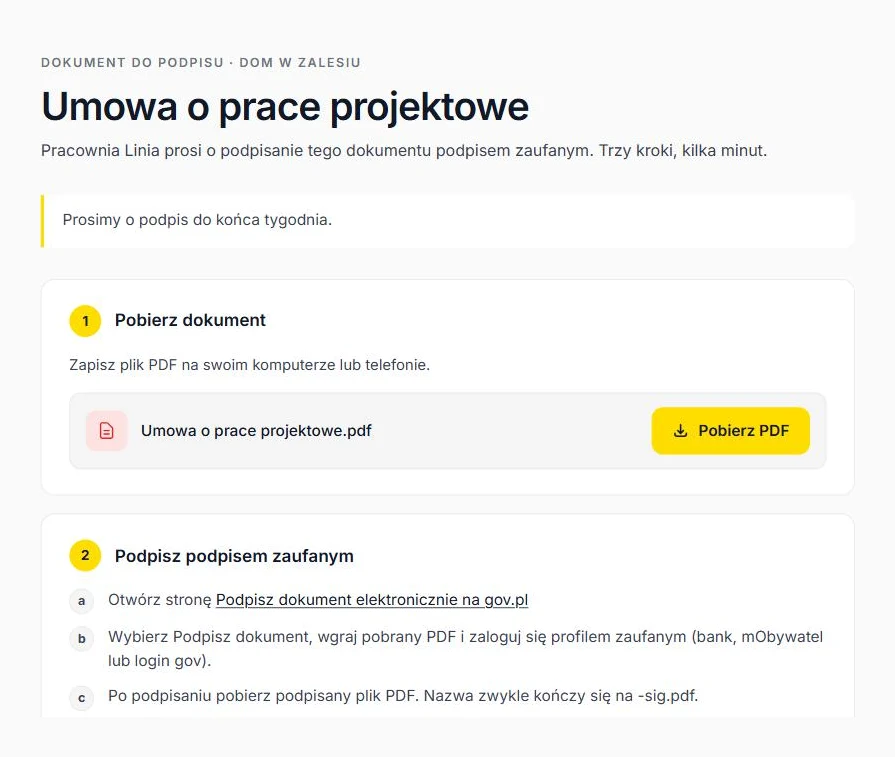
What the signer sees
A page in the office colours with three steps and one file. No account, no installation, works on a phone. After uploading they see who else still has to sign, and the project client returns to their portal with one button.
- Signing instructions for gov.pl right on the page, with a link to the service
- A warning when the uploaded file does not look signed
- The office email address for anyone who prefers to send the file back by email
Who signs in an architecture office
Client
Design contract, amendments, written approval of the concept. Signs from their portal, a “Sign document” button appears next to the file.
Site manager, engineer
Statement of accepting duties, trade coordination sign-offs. Gets a link by email, needs no account or portal.
Neighbour, co-owner
Consent to build on the boundary, statement of the right to use the property. One link, three steps, no visit to the office.
Questions about e-signatures
Is the trusted signature enough for a client contract?
Does ArchiFlow verify who signed?
What if two people sign at the same time?
Where is the signed file stored?
Does a signer need an ArchiFlow account?
How much does it cost?
Your first project
in ten minutes.
Create the office, add a project and send the client a link. No card needed.